
Screenshots
App details
- Version
- 22.0
- Size
- 2.04 MB
- Updated
- June 27, 2024
- Requires
- Windows 11
- License
- Free
- Developer
- Cigati Solutions
- Category
- Windows OS
SoftPas in:
This product is also available in the following languages:
About Cigati SQLite Database Recovery
Download Cigati SQLite Database Recovery – Free, Secure, Fast Recovery Tool for SQLite2 & SQLite3 Files
Looking for a reliable way to recover corrupted SQLite databases? The Cigati SQLite Database Recovery tool is a powerful, free Windows utility designed to restore damaged SQLite2 and SQLite3 database files. Whether you're a developer, system administrator, or casual user relying on SQLite-based applications, this software provides a straightforward solution to recover lost or inaccessible data. With dual recovery modes—repair and extraction—users can either fix the original file or export data into a clean, usable database. Its intuitive interface makes it accessible even to non-technical users, while its robust engine ensures high success rates on moderately to severely corrupted databases. The tool supports both legacy and modern SQLite formats, making it a versatile choice for various recovery scenarios. Best of all, you can download the free demo version to test its capabilities before committing to a full recovery. With no installation required, it’s a lightweight, secure, and efficient tool that integrates seamlessly into your data recovery workflow.
Key Features of Cigati SQLite Database Recovery
One of the standout aspects of Cigati SQLite Database Recovery is its dual-mode recovery system, which gives users flexibility based on their specific needs. The Repair Mode attempts to fix the original corrupted database file, allowing you to resume using it without the need for re-importing data. This is particularly useful for developers or applications that rely on persistent database connections. On the other hand, the Extract Mode focuses on salvaging as much data as possible and exporting it into a new, clean SQLite3 file—ideal when the original file is too damaged to repair. This feature ensures minimal data loss and maximum usability.
Another major advantage is its broad compatibility with both SQLite2 and SQLite3 formats, supporting a wide range of applications such as mobile apps, desktop software, and embedded systems. The tool efficiently scans corrupted files, identifies recoverable tables, and reconstructs them with accurate data structures. It also preserves primary keys, indexes, and constraints where possible, ensuring data integrity post-recovery. The interface is refreshingly simple: just load the damaged file, choose your recovery mode, and let the tool do the rest. There’s no steep learning curve, and the entire process typically takes just seconds to minutes, depending on file size.
Additionally, Cigati offers a free demo version that allows you to preview recoverable data before purchasing the full license. This transparency builds trust and lets users assess the tool’s effectiveness firsthand. The software is lightweight, requires no installation, and runs directly from the downloaded folder—perfect for on-the-go recovery tasks. Whether you're recovering data from a lost mobile app or a critical desktop application, Cigati SQLite Database Recovery delivers a secure, fast, and reliable solution.
How to Install and Use Cigati SQLite Database Recovery
Using Cigati SQLite Database Recovery is incredibly straightforward, especially for users who are not tech-savvy. The software is distributed as a standalone executable file, meaning you don’t need to go through a traditional installation process. To get started, simply download the tool from the official Cigati Solutions website, extract the ZIP file to a folder of your choice, and run the executable file (usually named cigati_sqlite_recovery.exe). No administrative rights or system modifications are required—perfect for users working on restricted corporate machines.
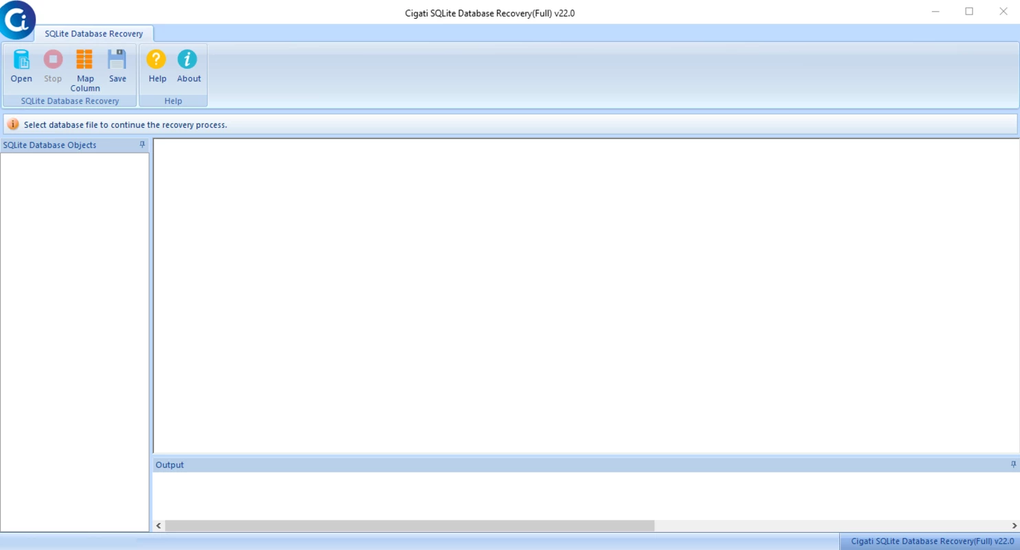
Once launched, the main interface presents a clean layout with clear navigation. Click on the “Open” button to browse and select your corrupted SQLite2 or SQLite3 file. The tool will automatically analyze the file structure and display a summary of recoverable tables and data. From here, you can choose between two recovery options: Repair (to fix the original file) or Extract (to create a new, clean database). After selecting your preferred mode, click “Recover” and wait for the process to complete. The tool provides real-time progress updates and logs, so you can monitor the recovery status.
Upon completion, you’ll be prompted to save the recovered data. If you chose repair mode, the fixed file will be saved to your specified location. In extract mode, a new SQLite3 file is generated with all recoverable data. You can then use this file in your applications, import it into another system, or back it up for safekeeping. For advanced users, the tool also supports command-line execution, allowing automation in scripts or batch processes. This makes it a valuable asset for developers managing large-scale database recovery workflows.
Compatibility and System Requirements
Cigati SQLite Database Recovery is specifically designed for the Windows operating system, making it ideal for users running Windows 7, 8, 10, or 11. It supports both 32-bit and 64-bit architectures, ensuring broad compatibility across different hardware setups. The software is lightweight, requiring minimal system resources—typically less than 50 MB of RAM during operation—so it won’t slow down your machine, even on older or low-end systems.
While the tool is currently only available for Windows, it’s important to note that SQLite databases themselves are platform-agnostic. This means that once you recover your data using Cigati, you can use the restored file on Mac, Linux, Android, or iOS devices, as long as the target application supports SQLite. For example, developers working on cross-platform mobile apps can recover corrupted databases on Windows and seamlessly transfer them to Android or iOS environments.
It’s worth mentioning that Cigati does not support direct recovery on Mac or Linux systems. However, users on these platforms can still benefit by copying the corrupted database file to a Windows machine, running the recovery tool, and then transferring the recovered file back. This workaround ensures that even non-Windows users can access the tool’s powerful recovery capabilities. The lack of native Mac or Linux versions is a minor limitation, but the tool’s cross-platform data compatibility more than compensates for it.
Pros and Cons of Cigati SQLite Database Recovery
- Pros:
- Free demo version allows preview of recoverable data
- Supports both SQLite2 and SQLite3 formats
- Two recovery modes: repair and extract
- Intuitive, user-friendly interface
- Lightweight, no installation required
- Fast recovery with real-time progress tracking
- Preserves data integrity, including keys and indexes
- Works on older Windows systems (Win 7 and above)
- Cons:
- Only available for Windows (no native Mac/Linux support)
- Advanced features like batch processing require command-line use
- Recovery success depends on the severity of corruption
- No built-in backup or scheduling options
- Full version requires purchase for permanent use
Frequently Asked Questions (FAQ)
Is Cigati SQLite Database Recovery free to use?
Yes, Cigati offers a free demo version that allows users to preview recoverable data from corrupted SQLite files. However, to save or export the recovered data permanently, you must purchase the full license. The demo is fully functional for evaluation purposes.
Can I recover data from SQLite2 databases?
Absolutely. Cigati SQLite Database Recovery supports both SQLite2 and SQLite3 file formats, making it suitable for legacy applications as well as modern software that uses SQLite databases.
Does the tool require installation?
No, Cigati SQLite Database Recovery is a portable application. You can simply download the executable, extract it, and run it directly—no installation or system changes are needed.
Can I use the recovered database on Mac or Android?
Yes. SQLite databases are platform-independent. Once recovered using Cigati on Windows, you can transfer the file to Mac, Linux, Android, or iOS devices and use it in any application that supports SQLite.
What if the recovery fails?
Recovery success depends on the extent of corruption. For severely damaged files, some data may be lost. However, the demo version lets you assess recoverability before purchasing. For critical data, consider using multiple recovery tools or consulting a professional data recovery service.
Final Verdict: Is Cigati SQLite Database Recovery Worth It?
If you’re dealing with a corrupted SQLite database and need a fast, secure, and reliable recovery solution, Cigati SQLite Database Recovery is one of the best tools available—especially for Windows users. Its dual recovery modes, intuitive design, and support for both SQLite2 and SQLite3 make it a versatile choice for developers, IT professionals, and everyday users alike. The free demo is a major plus, allowing you to test the tool’s effectiveness without risk.
While the lack of native Mac and Linux support is a limitation, the cross-platform nature of SQLite databases means you can still leverage the tool on non-Windows systems via a Windows machine. For those who frequently work with SQLite files, the ability to recover data quickly and safely is invaluable. Whether you’re recovering data from a mobile app, desktop software, or embedded system, Cigati delivers excellent value for money.
Download Cigati SQLite Database Recovery today and protect your critical data from loss. With its proven track record, lightweight design, and user-friendly interface, it’s a must-have tool in your digital toolkit. Don’t wait until data loss happens—be prepared with a trusted recovery solution.
Guides & Tutorials
How to install Cigati SQLite Database Recovery
- Click the Download button above.
- Once redirected, accept the terms and click Install.
- Wait for the Cigati SQLite Database Recovery download to finish on your device.
How to use Cigati SQLite Database Recovery
This software is primarily used for its core features described above. Open the app after installation to explore its capabilities.
User Reviews
No reviews yet. Be the first to share your experience.
You may also like
more
Llama 2
Free-to-use large language model As the new addition to Meta’s arsenal of langua...

NotebookLM
Revolutionizing the note-taking and idea-generation process NotebookLM is an exp...

Github co pilot
AI-inspired software development and coding platform GitHub Copilot is a browser...

Google Gemma
Google’s lightweight AI models Introducing Google Gemma , a family of cutting-ed...

AI Image Enlarger
A free app for Windows, by ai-image-larger. AI Image Enlarger is a free software...

DALL E
AI-driven text-to-image transformation engine DALL·E is a free graphic and desig...